Troubleshooting
Contents
When encountering issues with CEINMS-RT, the following solutions might be adequate:
No access to the repository
Make sure you have proper clearance to access the repository. If you don’t have the necessary permissions, you won’t be able to download files. Check with the repository administrators or owners to ensure that you have the required access rights.
If further clearance is needed, you should contact the members of the repository and clarify your intentions for accessing the files. Politely request additional clearance if required, explaining the purpose and reasons behind your request.
Repositories often have specific access control mechanisms in place to protect sensitive or proprietary information. Unauthorized access attempts may be flagged and could lead to account suspension or other penalties.
Enter SSH passphrase
If a password for the rsa SSH key is already in place, try filling in the password. If the password does not get you through, you can change
the password. Open a command terminal and navigating to C:/Users/<UserName>/.ssh with the cd command. After this, we change the password using the command:
ssh-keygen -p -f id_rsa
You will be prompted to enter the old passphrase. After the old passphrase, you will be prompted to enter a new passphrase. Repeat this new passphrase once more if you are required to do so. Now, the passphrase has been updated.
If the old password is unknown, there is no way to change or retieve this password. A new key must be requested or made.
Cannot find ‘CMakeLists.txt’
In case of the CMake error “(add_subdirectory): The source directory (lib/* | plugin/*) does not contain a CMakeLists.txt file”, type in the terminal:
git submodule update --init
Cannot open file ‘glew-2.1.0/lib/Release/x64.obj’
The ‘glew32.lib’ and ‘glew32s.lib’ need to be set in the CMake path, as shown below:
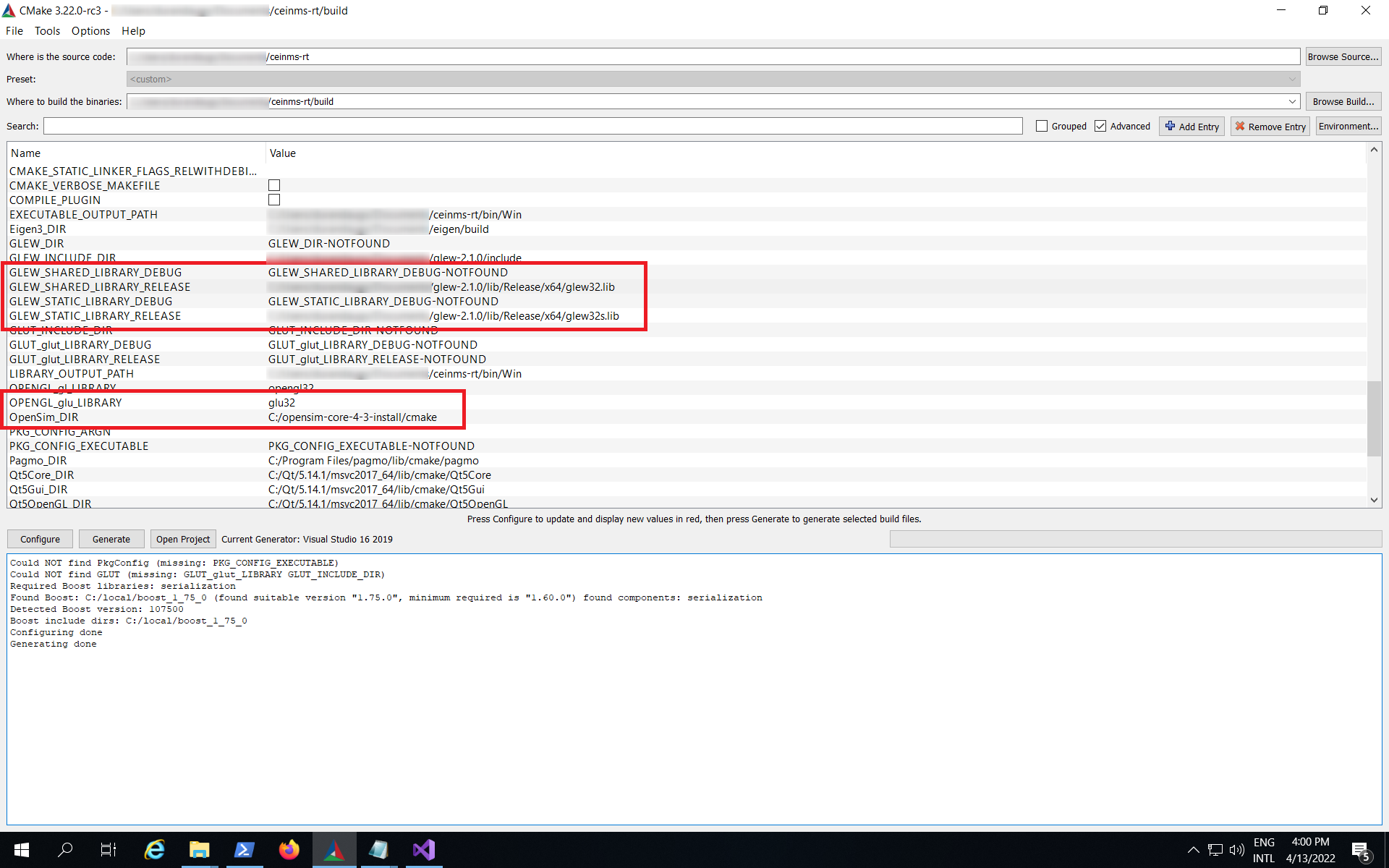
Cannot find the ‘glew32.lib’ or .dll
Add or modify variable CMAKE_PREFIX_PATH in the CMAKE GUI to include the path to the Glew folder.
If you still have problems also the variable GLEW_HOME_DLL and fill it with the path to the .dll file.
XSD
In case of compilation error “C2872: ‘DOMDocument’ : ambiguous symbol”, in the file ‘C:\Program Files (x86)\CodeSynthesis XSD 4.0\include\xsd\cxx\tree\serialization.txx’ change:
104DOMDocument& doc (*e.getOwnerDocument ());
into:
104xercesc_3_1::DOMDocument& doc (*e.getOwnerDocument ());