Compilation plugins
Setup
Important
Make sure the newest version of CEINMS-RT is installed on your system before proceeding to this section. A guide to installing CEINMS-RT can be found in the Installation section.
CMake GUI
During the installation process, CMake has been installed on your system. We will now use this software to create a Visual Studio solution from which we can build the CEINMS-RT plugins.
First, search for the cmake-gui app by opening the Windows search bar. This can be done by pressing the Windows key and typing “cmake”. After finding cmake-gui, open it.
You will now be greeted with the GUI of CMake:
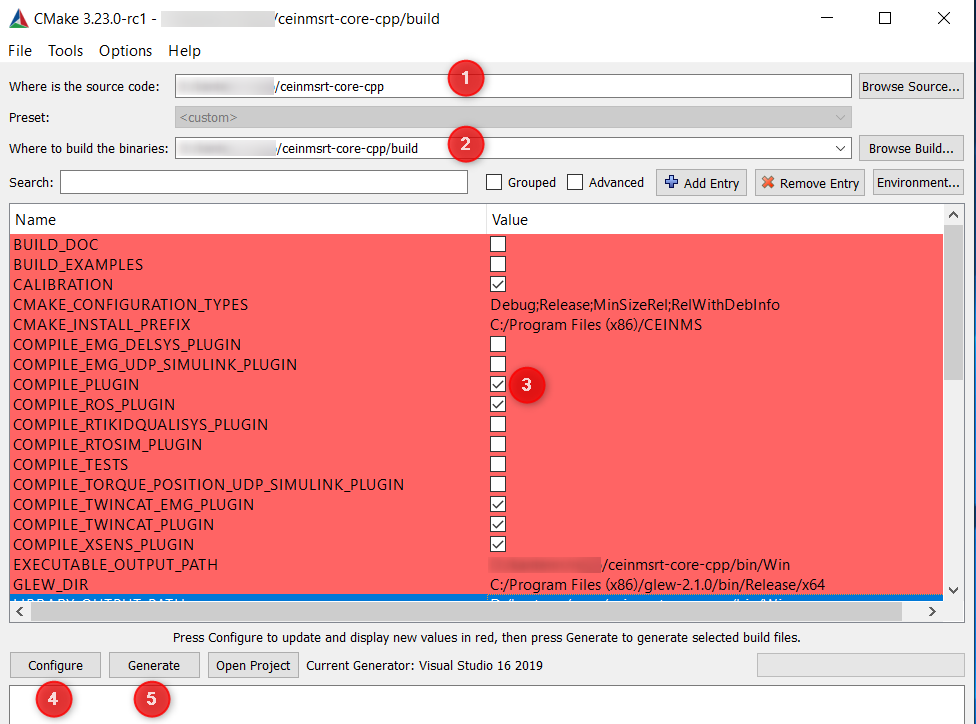
For field
Where is the source code(1) fill in the path of the folder that was created during installationFor field
Where to build the binaries(2) fill in a subfolder “/build”Enable
COMPILE_PLUGIN(3)Press Configure (4)
Once configuration is complete, select the plugin(s) that you would like to compile
Press Generate (5)
Once generation is complete press Open Project to open the Visual Studio Project where you can perform the actual compilation
Command Line cmake tool
cd build
cmake .. -DCOMPILE_PLUGIN=ON -DCOMPILE_OSL_PLUGIN=ON ...
To resolve any compilation errors that arise during this build, please refer to the Troubleshooting section. See